From messy piles of cables that resemble spaghetti more than wiring, to duct-taped fixes that make no sense at all, tech support gaffes are the comedy of our digital age. These 20 photographs show the worst setups you will ever see, moments where improvisation went way too far and turned into lasting problems. Funny and painful at the same time, this collection proves that not all heroes wear capes. And yet, behind every tangled mess lies a story of creativity and questionable problem‑solving skills.
1. Survival Mode, The Laptop That Refused to Die

In a scene equal parts tragic and comic, a laptop clings to life with strips of duct tape holding its fractured frame together. The machine tells a story of improvisation and resilience, where necessity overrides aesthetics. It’s a reminder that sometimes survival in the digital age is less about sleek design and more about sheer determination.
2. Inside the Heart of a Machine

The anatomy of a desktop computer lies exposed: motherboard, power supply, and cables sprawled like veins of a living system. The detached front panel and scattered screws tell the story of maintenance in progress, a moment where technology pauses to reveal its inner workings. It’s not just repair: it’s a reminder that every sleek screen and smooth interface begins here, in the raw circuit of a machine being carefully tended by human hands.
3. Exposed Wires, Exposed Risks

The wall tells a story of neglect, wires stripped bare, a socket plate hanging loose, and a plug still clinging to life in a dangerous embrace. One cable clings on, another dangles free, and the whole setup looks more like a dare than a design. It is the kind of socket that makes you think twice before charging your phone, proof that electricity doesn’t forgive sloppy work. It’s not just a broken fixture, it is a cautionary snapshot of the hidden risks behind the walls we trust.
4. Cable Management? Never Heard of It

What should be a streamlined backbone of communication instead resembles a chaotic organism, alive with potential but weighed down by disorder. Each wire carries the possibility of speed, access, and connection, yet the lack of organization hints at fragility. It’s a snapshot of modern dependence: the messy reality behind the seamless flow of information.
5. When Jurassic Park Meets Windows 7, A DIY Disasterpiece

In the wild world of homemade hardware, few sights are as unforgettable as this red‑framed relic running Windows 7. Surrounded by beer cans, toy cars, and tangled cables, the machine looks more like a garage art project than a workstation. With a mechanical dinosaur roaring from the desktop, the setup feels equal parts Jurassic Park and IT horror story.
Trending on Wealth Gang


6. Spoon‑Powered Server

This custom rig looks less like a data center and more like a comedy sketch in progress. With cables spilling everywhere, a GPU standing tall, and a spoon taped to a fan like some kind of DIY antenna, the setup is equal parts genius and chaos. The glowing LEDs insist it’s alive and working, but the spoon steals the spotlight, proof that in tech support gore, even cutlery can become part of the network infrastructure.
7. A Patchwork of Batteries Fuels Life Back Into Old Tech

In a clever yet unconventional repair, this device has been outfitted with a mix of power sources: an Amazon Basics 9V battery paired with two cylindrical cells, all held together with hot glue inside its casing. The gold contact pins suggest it once relied on a proprietary battery pack, but the improvised setup reveals a resourceful attempt to keep the gadget running. It is a snapshot of DIY ingenuity, where necessity sparks creativity and everyday components are recycled to extend the life of aging electronics.
8. Laundry Goes Online

In this unusual household setup, a Beko washing machine hums through its cycle while a tangle of Ethernet cables dangles above, feeding a router on a wooden shelf. The juxtaposition of clean clothes and clean connections turns the laundry room into a hybrid hub, where domestic chores share space with digital infrastructure. It’s a snapshot of modern living, blending everyday utility with the invisible backbone of home networking.
Sign up for our newsletter
9. Power Meets Precision: A Liquid‑Cooled Beast

Inside this rig, performance and artistry collide. The ASUS TUF motherboard anchors a custom liquid cooling system, its neon‑green tubes weaving through the case like veins of raw energy. A reservoir and radiator keep the CPU running cool under pressure, while every detail: from the RAM slots to the PCIe lanes, signals a machine built not just for gaming, but for pushing boundaries. It is more than hardware; it’s a statement of control, speed, and style.
10. Innovative Duct‑Taped Dynamo

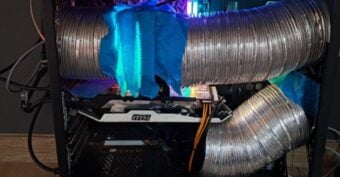
Two gleaming aluminum ducts snake into the case, channeling airflow with a DIY bravado that’s as bold as it is functional. Secured with blue painter’s tape and lit by RGB glow, the MSI graphics card sits at the heart of this experiment in cooling ingenuity. It’s not just a computer, it’s a testament to the lengths enthusiasts will go to keep their machines running cool and unique.
11. When Tech Becomes Tableware

In the quiet chaos of an outdoor gathering, one cracked Huawei phone found its final calling: not as a communication device, but as the unlikely foundation for a glass. Balanced precariously atop another phone dressed in a circuit-board case, the setup looked less like modern convenience and more like a ritual of improvisation. This is tech support gore in its most casual form: devices stripped of their intended purpose, repurposed into props, and left to bear the weight of human need.
12. The DIY Horror of Mobile Repair

Some tech support gore doesn’t come from tangled cables or shattered screens, it comes from human ingenuity gone wrong. It’s a snapshot of desperation and improvisation: the moment when a phone stops being a lifeline and becomes a cautionary tale, a reminder that not all fixes are created equal, and some scars are permanent.
13. Foiled Connections, The Patchwork Life of a USB

In the world of tech support gore, sometimes the battlefield isn’t a server room but a single cable. This USB plug, wrapped in copper tape and adorned with a mysterious disc, tells the story of improvisation under pressure. It is a quiet testament to human creativity, and to the lengths we’ll go to keep our devices alive just a little longer.
14. Plugged Into Peril

Two stripped wires, crudely looped under screws and forced into the socket, transform a simple connection into a ticking hazard. It’s the kind of shortcut born of impatience or desperation, where safety standards are abandoned in favor of “just making it work.”
15. Red Ink, Red Shell: The Printer’s Second Life

Once a humble HP PSC 1410, this all‑in‑one machine now wears a coat of red that tells a different story. The paint clings unevenly to its casing, worn at the edges like battle scars, while the control panel buttons still shine through with their original colors, stubbornly resisting the makeover. In the world of tech support gore, this isn’t just a device, it’s a relic of reinvention. A machine forced into a new identity, carrying both the weight of utility and the marks of human creativity gone rough around the edges.
16. Wires in the Wild
This power box shows wires connected in a way that is not safe. The brown and blue cables are stripped and pushed under screws, instead of being fitted with proper plugs. The switch looks normal with its “on” and “off” marks, but the inside tells another story. Loose wires and quick fixes can cause sparks, shocks, or even fire. It works for now, but it is a reminder that shortcuts with electricity can be very risky.
17. Held Together by Tape: The PC Fix

Inside this computer, the hard drive isn’t mounted with proper brackets , it’s strapped in place with black tape. Cables run across the case in a messy way, connecting power and data where they can. The motherboard and memory still look fine, but the taped drive shows how quick fixes can keep a machine running even when parts are missing. It works for now, but it is a reminder that not all repairs are safe or reliable.
18. The Data Center Mess
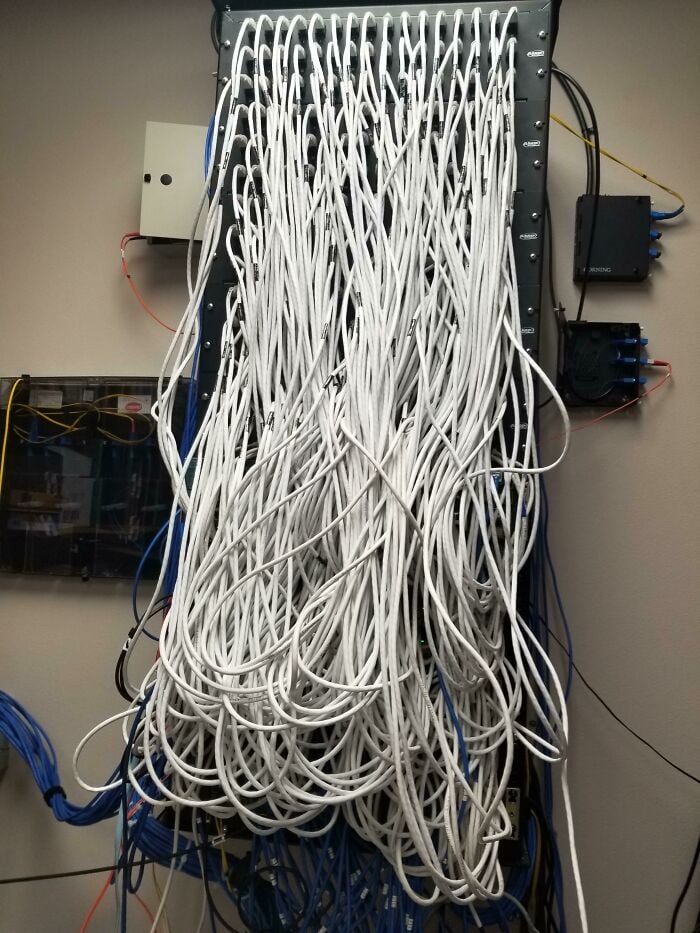
This server rack is packed with white Ethernet cables that twist and tangle in every direction. The patch panels are full, but the lack of order makes the whole setup look like a knot that’s hard to undo. It still works, but finding the right line or fixing a problem would be slow and frustrating. This is tech support gore in its purest form: a reminder that without cable management, even the strongest network can turn into a maze.
19. Cool Fix: A Fan in the Cabinet

This control cabinet looks neat and well‑organized, with wires and modules lined up carefully. But inside, a small desk fan has been added to keep things cool. It’s a clever shortcut, showing how people sometimes use everyday items to solve technical problems. The fan may help for now, but it also shows that even in professional setups, quick fixes can sneak in when heat becomes an issue.
20. iPhone, Reinvented

Wrapped in overlapping strips of silver duct tape, this smartphone wears its scars like a badge of honor. It’s a portrait of resourcefulness, where high‑end design collides with everyday fixes, and resilience takes the shape of wrinkled tape edges. A reminder that sometimes the most memorable upgrades are not found in the Apple Store, but in the toolbox.
If you liked this piece, you will also enjoy:
- How To Make Money Off Of Old Electronics: Tips on selling, recycling or trading in outdated devices to turn clutter into cash.
- The Cost Of 1980s Technology: How Much Did Gadgets Really Cost Back Then?: A nostalgic look at how expensive gadgets like VCRs, PCs and mobile phones were in the 1980s compared to today.
- 10 Old Tech Gadgets Worth A Pretty Penny Today: A roundup of retro devices that now carry high resale value among collectors.